
I have brand new, fancy social networking icons at the bottom of my posts (before the comments) now for sharing my posts. I wrote the code, and the icons themselves are courtesy of Komodo Media. You must have javascript enabled to see them.
In Google Chrome and Safari1 they even have a nice little fade effect when you hover over them. Firefox and Internet Explorer do not support the fade effect. That's still 15% of my traffic that should see the fade effect.
If the icons appear in a vertical list and/or you can see both the small and large versions of the same icon at once, it means your browser still has the old css cached. Simply hold down the Shift key and click your browser's reload button. This will perform a hard reload, and force the browser to download the latest css file.
I decided to include 9 of the major social networking sites: Delicious, Digg, Facebook, Mixx, Reddit, Stuble Upon, Technorati, Twitter, and Yahoo! Buzz. I chose these ones because they are the ones I see most often elsewhere.
So go my minions2, those icons aren't just there for looks. Share links to my blog!
1: I do not have Safari, so the fade effect is untested in Safari.
2: Yeah, like I have enough of a following to even have minions...
Tuesday, December 15, 2009
«Social Networking Icons»

Friday, November 27, 2009
«MasterMarf on Twitter»
I have a Twitter account now. Woo! I don't know how much I'm going to use it. I don't know much about Twitter. I just wanted to grab the MasterMarf username. If it turns out that I use it a lot, I'll replace the "Marf's Shared Stuff" widget out on the homepage with my twitter feed. Or I may merge them, who knows.
I was setting up the new search subdomain for my website in the GoDaddy control panel, and I kept seeing Twitter icons everywhere telling me to see if my domain name is available on Twitter. That's what finally made me do it. I decided, why not? If I don't use it, it can just sit there. At least I have the username now.
Now, the new search domain I mentioned... When you do a site search with my little Google search bar in the top of the sidebar, the address of the results page is now at http://search.mastermarf.com/ instead of http://mastermarf.com/search-results.html. A small change, no one would really notice but me. The reason I did it is because how I had it set up before, my .htaccess file blocked me from my own access logs. Anyway, I got that straitened out.
Wednesday, July 1, 2009
«Fix For Asinine Comments»
So I had a couple of comments that were just the same letter repeated over and over with no spaces between them. It caused the comment to extend way beyond the side of the site. I deleted those comments, but I also fixed the problem.
Now in the event of an asinine comment like that, a scrollbar will appear instead. I tell you... You've got to idiot proof everything. I'll make a comment to this post to demonstrate what I'm talking about.
Also, starting tomorrow I will start seriously posting photos from my vacation a while back. You're in for a treat!
Wednesday, April 22, 2009
«Tweaked Ads' Color Pallet»
I changed the colors slightly on the ads in the sidebar and the footer. The one in the sidebar won't show in an item page; it'll only display on the main page or an archive page (or on a blog supplement page).
Instead of blending the ads in, I'm trying a complement-style color pallet. They stand out more, but I don't think they're distracting. They had the same color background as the rest of the page: hexadecimal color code #191919. Now I've changed them to have a background color the same as the header: hexadecimal color code #4F4C48.
I've also added little 14x14 pixel icons in a few places. I've removed the directional arrows that corresponded to the dates in favor of little calendar icons. Also, down at the bottom of each post where it says the time it was posted there's now a little clock icon.
Thursday, April 9, 2009
«Comment Appearance Re-designed»
I updated something else on the blog, again. I go through spurts like this.
I've seen on many blogs where if the post author makes a comment, it'll be highlighted in some way so it is easier to pick out amongst all the other comments. I've been meaning to highlight my own comments here for a while now. I've seen how to do it in various places. Blogger Buster, for example, has a great tutorial on how to do it in a blogger blog. I finally got around to doing it.
Like any project, one thing leads to another... I re-designed the entire appearance of the comments. Now each comment has a border, no longer uses a definition list, and the comments are numbered! (yay!)
In the unlikely event that one of my posts gets hundreds of comments and there's actually a "Next Page" for comments, I have a javascript in place that will kick in to correct the comment numbering. Otherwise the comment numbering would start over at 1 on each page.
You can either make a comment here (or in any of my posts) to see the outcome. Or you can check out a post that already has a few comments.
EDIT: I also got rid of those annoying dotted horizontal lines that were in the sidebar.
Wednesday, April 8, 2009
«Duplicate Title Tag Fix»
For the fellow blog owners out there that use Google Webmaster Tools, have you ever checked for duplicate title tags? You can find it under Diagnostics/Content analysis. If you do have duplicate tags (and I'm betting you do), they will show under Title tag issues.
If you're anything like me, you try your best to avoid duplicate title tags. It is why I use strange title names for a few of my post series (like Caturday, for example). Also, if you're anything like me you'll be shocked and applauded by all the duplicate tags that are still being reported; despite your best efforts.
When you dig down and figure out what is causing the duplicate title tags you'll find they are from things like comment permalinks like this: /2009/02/vince-offer.html?showComment=1239111420000
Some of them were really god-awful like this one: http://www.mastermarf.com/2009/02/vince-offer.html?widgetType=BlogArchive&widgetId=BlogArchive1&action=toggle&dir=close&toggle=YEARLY-1199178000000&toggleopen=MONTHLY-1222848000000
That brings up the exact same page as /2009/02/vince-offer.html, only it has a bunch of unnecessary query tags tacked on. What's worse is, sometimes googlebot will think that the long one is the true page and drop the short (correct) one from the index.
The fix is finally at hand. Google (and the other major search engines) are now supporting what's called canonical links. Basically they tell the search engine spiders where the "real" version of a page is located. They are extremely useful for situations like I described above or where duplicate content is likely to be generated.
Here's the code for your blogger layout so you too, will no longer have this issue. Put it somewhere just before the </head> tag in your html layout:<link expr:href='data:blog.url' rel='canonical'/>
That will strip all the unnecessary query tags off the url and point the search engine bots to the shortened url so they can index that one. After your pages are re-indexed you won't have duplicate title tag issues from comment permalinks anymore. All the major search engines use and support these canonical links.
I had a couple hundred duplicate title tags, and within a week of putting in the canonical links I'm down to 5. I trust those won't be around much longer, either. It might take longer for your site. For some reason googlebot really likes my site (crawling an average of 183 pages per day).
Tuesday, April 7, 2009
«Radical Image Optimization Tool»
I made 3 changes to the blog:
- Optimized background image filesize
- Reduced posts shown on the homepage
- Brought back the embedded comment form
Using the Radical Image Optimization Tool (RIOT), I shrank the filesize of a few of the background images in the blog layout. It only amounted to a total gain of 38,677 bytes, but anything helps speed up the page load.
It didn't seem to gain anything on jpg images without further quality loss. However, it did gain on changing some of the gif images to png images. That surprised me a bit. I've always thought gif was a smaller format than png. Gif is limited to a 256 color index and has a very basic alpha channel (transparency). Whereas png can be truecolor and has better alpha channel support.
I also reduced the number of posts shown on the homepage down from 9 posts to 7 days. I almost always make a single post a day, so this should usually be 7 posts shown on the homepage. Again, in an attempt to speed up load times. I also figured it makes sense to show a week's worth of posts. I don't need any more than that.
I also brought back the embedded comment form. I got around the issue I had with it by providing a link to the old comment page. So you'll see that at the bottom of every post page.
See the rest of “Radical Image Optimization Tool”»
Wednesday, February 25, 2009
«Label Cloud Widget»
I've added a new widget at the bottom of the page. It's a label cloud; the larger and brighter the link, the more posts there are that have that label.
I saw the widget in use on a random blog I came across, and I really liked it. After a little searching, I found the code and where it came from. I'm using the version that can be found at Widget-based.
For the sake of preservation, I'm going to include the code for the widget here as well. There hasn't been a new post on the Widget-based blog since 2006 (only 8 total posts), and I'd hate for it to be deleted and this version of the code lost.
Installation in two parts, you'll want to Expand Widget Templates for this:/* Label Cloud Styles
----------------------------------------------- */
#labelCloud {text-align:center;font-family:arial,sans-serif;}
#labelCloud .label-cloud li{display:inline;background-image:none !important;padding:0 5px;margin:0;vertical-align:baseline !important;border:0 !important;}
#labelCloud ul{list-style-type:none;margin:0 auto;padding:0;}
#labelCloud a img{border:0;display:inline;margin:0 0 0 3px;padding:0}
#labelCloud a{text-decoration:none}
#labelCloud a:hover{text-decoration:underline}
#labelCloud li a{}
#labelCloud .label-cloud {}
#labelCloud .label-count {padding-left:0.2em;font-size:9px;color:#000}
#labelCloud .label-cloud li:before{content:"" !important}
<b:widget id='Label1' locked='false' title='Label Cloud' type='Label'>
<b:includable id='main'>
<b:if cond='data:title'>
<h2><data:title/></h2>
</b:if>
<div class='widget-content'>
<div id='labelCloud'> <ul>
<b:loop values='data:labels' var='label'>
<li>
<b:if cond='data:blog.url == data:label.url'>
<data:label.name/>
<b:else/>
<a expr:href='data:label.url'><data:label.name/></a>
</b:if>
(<data:label.count/>)
</li>
</b:loop>
</ul></div>
<script type='text/javascript'>
// Label Cloud User Variables
var maxFontSize = 20;
var maxColor = [168,181,248];
var minFontSize = 8;
var minColor = [0,0,0];
var lcShowCount = false;
var minPostCount = 0; //integer
// Don't change anything past this point -----------------
function s(a,b,i,x){
if(a>b){
var m=(a-b)/Math.log(x),v=a-Math.floor(Math.log(i)*m)
}
else{
var m=(b-a)/Math.log(x),v=Math.floor(Math.log(i)*m+a)
}
return v
}
var ta=0;
var c=[];
var labelCount = new Array();
var ts = new Object;
<b:loop values='data:labels' var='label'>
<b:if cond='data:label.count'>
if (<data:label.count/> > minPostCount) ts["<data:label.name/>"] = <data:label.count/>;</b:if></b:loop>
for (t in ts){
if (!labelCount[ts[t]]){
labelCount[ts[t]] = new Array(ts[t])
}
}
tz = labelCount.length-1;
lc2 = document.getElementById('labelCloud');
lc2.innerHTML = '';
ul = document.createElement('ul');
ul.className = 'label-cloud';
for(var t in ts){
for (var i=0;3 > i;i++) {
c[i]=s(minColor[i],maxColor[i],ts[t]-ta,tz)
}
var fs = s(minFontSize,maxFontSize,ts[t]-ta,tz);
li = document.createElement('li');
li.style.fontSize = fs+'px';
li.style.lineHeight = '1';
a = document.createElement('a');
a.title = ts[t]+' Posts in '+t;
a.style.color = 'rgb('+c[0]+','+c[1]+','+c[2]+')';
a.href = '/search/label/'+encodeURIComponent(t);
if (lcShowCount){
span = document.createElement('span');
span.innerHTML = '('+ts[t]+') ';
span.className = 'label-count';
a.appendChild(document.createTextNode(t));
li.appendChild(a);
li.appendChild(span);
}
else {
a.appendChild(document.createTextNode(t));
li.appendChild(a);
}
ul.appendChild(li);
abnk = document.createTextNode(' ');
ul.appendChild(abnk);
}
lc2.appendChild(ul);
</script>
<b:include name='quickedit'/>
</div>
</b:includable>
</b:widget>
This is the first blog post that uses my new code boxes. I'll still use the old style for short code snippets.
EDIT: I've decided to maintain consistency and use this style of code block for all code; even short snippets. Please tell me what you think of it.
Tuesday, February 17, 2009
«Megagaltastic»
I just wanted to point out that there's no word in the English language that means "having an extensive vocabulary". The word megagaltastic has been selected for this meaning. However, in order for a word to be added to the Oxford English Dictionary, it needs at least five published instances of the word, and it needs to be at least five years old.
It has been published in many places now, mainly by people that wanted to be megagaltastic. And so far, I think the word is about half way through its age requirement. It became widespread on October 19th, 2006 when it was used on The Show With ZeFrank.
Oh, yeah. There's been a minor change with the layout. The location and placement of the orange guillemets (the « and » symbols; talk about being megagaltastic...) have been tweaked. I added them around the title of each post, and removed the first one on the "See the rest of..." link (can be seen out on the main page of the blog).
Friday, February 13, 2009
«Finally Linked AdSense and Analytics»
I finally got the option available to me to link Google AdSense and Google Analytics. I've only been waiting since they announced it in October of last year. I know Google rolls out updates slowly to their users, but come on... That took 5 months!
It probably would have been longer if I didn't run across their AdSense / Analytics interest form. The link to this form can also be found at the top of the Official AdSense blog.
So I have them linked. I should be able to get more detailed information about the performance of my ads now. Although at the time of writing this, no data is showing up in my Analytics account about AdSense yet.
One little thing that threw me for a bit during the linking process: They ask you to chose a primary domain to link to. All other domains other than the primary must have an additional bit of code inserted in. I was thinking that since I use a few subdomains (extras, www, and pictures) that I'd need this little code snippet. However, I couldn't find it anywhere.
Turns out that by "different domains", they really meant different profiles in Analytics. I track all my subdomains under the same profile in analytics, so I should be good. I shouldn't need to add any extra code anywhere.
You might be wondering why I even have ads. Well, they're primarily to pay for my domain name and monthly hosting costs. "But wait!" you say to yourself, "Blogger is a free service! There's no hosting costs involved!" Well, you're right... Sorta.
I pay (through GoDaddy) for my mastermarf.com domain name. I also have a hosting account through GoDaddy that hosts the Games section, as well as all the images you see here on the blog. I did not like the limitations of the built-in image hosting that blogger provides. And yes, I do make enough from the ads to cover my costs.
Thursday, February 12, 2009
«Subscribed By Email?»
For those of you who are subscribed to my blog by email, I have just recently subscribed to my own blog via email. What does this mean to you? It means that I'll finally be able to see what you see. So I'll be able to tweak how it looks if something is wrong. It only took me over a year since I added the option before I bothered to even test it. Hi there.
There's a few people that have subscribed via email, but have not clicked the confirmation link in the email that is sent to them. I'm going to be sending out messages to these people to see if they still want to be subscribed.
The emails will read:
Where [DATE] is the date that they tried to subscribe, and [EMAIL ADDRESS] is the one found in my About Section. I didn't include the address here in this blog post because I don't want spambots to pick up the address (I have scripts in place to prevent that on my About page).
On [DATE] you (or someone else) signed up your email address to receive daily email updates from Master Marf ( http://www.mastermarf.com ).
I've just been checking my subscriber records and I've noticed that you did not complete the subscription process.
Your email address was added to the subscriber list, but for some reason you did not confirm your subscription when I sent a follow up email asking you to do so. Unfortunately, the Feedburner system I use requires this confirmation, so I've not been able to send updates.
Do you still want to get daily updates on my posts over at Master Marf?
If not, no problem. I am not into pressuring anyone into subscribing, I just wanted to make sure. Either ignore this email, or reply to it telling me you don't want to be subscribed, and I'll remove your email from the list.
If you do wish to receive the updates, I suggest you do one of 3 things:
1. Find the confirmation email that was sent to you on [DATE] and click the link confirming your subscription.
2. If you can't find it (and I understand how these things get lost or deleted) simply resubscribe via email by Clicking Here.
3. If you use a Feed Reader, I suggest you subscribe to my Web Feed instead.
Both the Web Feed and the Email Subscription links can also be found in the top of my sidebar on my site (just under the search bar). Once you've added your email and then confirmed it with the confirmation email that will come minutes afterwards you'll be set to go. You're free to unsubscribe at any point.
The subject line of the confirmation email should be something like this:
Activate your Email Subscription to: Master Marf's Blog
You may want to add [EMAIL ADDRESS] to your address book so your spam filters don't mistake the confirmation email or the daily updates as spam.
Thanks for your interest in Master Marf.
Cody Durkin
And no, this is not going to be an automated email, or an email that is sent out in bulk to many people. I hate it when people send the same email to tons of people. I'm going to be sending them out individually to specific people one at a time (there's really not that many to send anyway).
Personally though, I'd subscribe to the Web Feed if at all possible.
Wednesday, January 14, 2009
«Embedded Comment Form»
Now instead of having to click "Post a Comment" and going through that page, you can type your comment right into the white box at the bottom of a post (it will be under any existing comments).
I've been meaning to do this for a while. I would have did it sooner, but last time I tried this I got some weird blogger error when I tried to update my template.
So yeah, try it out.
Also, there's a spiffy new email address you can contact me by. You can find it in the About section, under Contact. I'm not putting it directly in this post because spam bots can pick it up. I have a special anti-spam bot script I wrote and installed in the About page. If you've been to the page before, you may have to clear your browser's cache in order to update it. Hint: It's no longer an "@gmail.com" address.
EDIT: I had a report that the new comment box doesn't work with mobile devices. Probably has something to do with the inline frame it uses. I can't do it any other way, so until I find a work-around I'm rolling back to the old commenting method. Inline frames aren't supported in XHTML 1.0 strict anyway. Sorry about that!
2ND EDIT: It's back with a link to the old comment page. That way in the event the embedded one doesn't work you can fallback to the old one.
Wednesday, January 7, 2009
«Image Search Fix»
A while back I started to notice a problem with my image hosting for my blog. It was taking longer and longer to get a directory listing of my pictures folder in FileZilla (an FTP program). The reason was the sheer number of images building up in the directory, and it was taking too long to download all the file names. I knew that it would only get worse as I put more images on my blog.
So I decided to break them out by year. I moved all my images from http://pictures.mastermarf.com/blog/ to http://pictures.mastermarf.com/blog/2008/. That way I can create a new folder for each year. For instance, now I'm uploading any new pictures to http://pictures.mastermarf.com/blog/2009/. It works great. A little slow getting the directory listing towards the end of the year, but manageable.
The only problem was that Google Image Search had already indexed many of the images at their old location. You'll notice when you do a Google image search you have the option to "See full size image". So now I had a lot of people getting a 404 not found error when they tried to view an image result from my page.
I finally fixed the 404 errors people were getting from the Google Image search results of my images that I moved into their 2008 folder. I wrote a short little PHP script and put it on the 404 error page for my pictures subdomain:<?php
$uri = $_SERVER['REQUEST_URI'];
if (stripos($uri,"/08") == 5)
{
$uriImage = substr($uri,6);
// Permanent redirection
header("HTTP/1.1 301 Moved Permanently");
header("Location: http://pictures.mastermarf.com/blog/2008/" . $uriImage);
exit();
}
?>
It's a 301 redirect to the new address for the images I moved. A 301 redirect basically says to the browser or search engine spider, "I have permanently moved to this new location." I had to tell the server to use PHP version 5 for the stripos() function. It didn't work when it tried to run in version 4.
What the script does is gets the web address that was requested and checks if "/08" is in the right position to be one of the images I moved. I did this because I only wanted to redirect the moved images. All the file names of the images I moved start with "08". I figured it was easier to do than have a long list of specific images to check for. Also, there is are no other file names that start with "08" in that directory, so it worked out.
The rest of the script is a pretty strait-forward 301 redirect. I pull just the file name out of the requested web address, and re-build the new web address right there inside the header() function.
I just hope it wasn't too late. I moved the images a while ago, so Google has had time to see the 404 Not Found error and remove the images from their index.
Tuesday, December 23, 2008
«Learning PHP»
 Yesterday I spent the day keeping myself busy with my blog supplement pages. I'm finally taking the time to learn php. I'm re-writing all my non-blog pages in php. The great thing about that is if I want to change something in the sidebar or whatever, I don't have to go through and make that same change over and over in the html code for each individual page. I'll change it once in the main php code, and it will take effect on every page.
The actual blog is hosted by Blogger, and thus will be unaffected by all of this.
Basically, I'm using the require() function to paste in all the code that is the same on every page; things like the sidebar and footer. It reduced the actual .html files for the web pages down to the content that is unique to that page. As an example, my template page that I use to create new pages was 200 lines (before actual content is added), now it is 31 lines.
None of the web addresses or file names are going to change, though. You'll notice they still have their .html extension. In fact, the files themselves are still .html files. I just told it to run .html as a php file with a little .htaccess magic:AddType application/x-httpd-php .php .htm .html
AddHandler x-httpd-php .php .htm .html
Also, the non-www version of my web address finally 301 redirects to http://www.mastermarf.com, as I've wanted it to all along.
I'm sure there's so many neat things I could do with php, I'm just beginning.
Thursday, October 30, 2008
«Need New Widget»
It's been gone for a while now, but for those of you wondering why the live blog activity widget is gone: it got glitched up. It started registering every visit as being on the Cruise Ship Watch: Serenade of the Seas post. So I got rid of it.
So I suppose I'm in the market for a new widget to take its place in the sidebar. Anyone know of any I should take a look at?
Tuesday, September 9, 2008
«New Header and Logo»
I've been wanting a logo for my blog for a while now. I've been trying to think up a design but kept coming up empty. Then it came to me. I already had one; my favicon. So I designed a logo for my header here at the blog, based on the favicon. If you have javascript enabled, the "M"s will light up slightly when you hover over it. When you click it, it takes you back to the blog's home page. What do you think?
Google Chrome has their logo that looks like a pokeball, I have my glowing green ball with an "M" across it. It all works out... I might make some banners and buttons later, but right now I don't have much need for them.
Friday, September 5, 2008
«Pictures Finally Moved Over»
 How many times have you loaded a page and started to read it, only to have it jump around because the pictures are still loading? That won't happen here now. I have specified the size of each picture in every post. That way the browser knows the size of the picture on its first pass and will start out with a space that size for the image. So when the picture loads, the text won't jump around to make room for it.
It might be worth it to go back and re-look at some of the photos I've put here in the past. Now when you "click to view full" you'll actually get the full-sized image; usually 2560x1920 pixels if it's a photo I took. The picture to the right is a good example; it is fish swimming upstream, I took the picture on August 31st (of 2008). Before, I had to shrink the "full size" images down or else the Picasa hosting would do it for me. They'll shrink down any image with a dimension over 1600 pixels. Now that I have my own hosting, I can provide the true full-size. It took some time to re-find the originals of the photos and upload them, but it was worth it.
Just under half a gigabyte of pictures (461 MB) have been moved over to the host. With this slow internet connection I have, I was uploading at a rate of about 0.4 MB every minute. So that 461 MB represents over 19 hours (1,153 minutes) of uploading (yes, have pity on me). It was spread out over the past week and a half, but that's still a long time to spend uploading. And that doesn't include the time I spent re-touching-up the original pictures in a photo editor and re-writing the html code for each image.
Each picture now has its own unique ID I can link to. If I want to talk about any specific picture I've put here in the past, all I have to do is link to it like this, and the page will automatically scroll down to the image when it loads. In that example I linked to a view of Ketchikan from my little trek over on Gravina Island.
If you're subscribed to my webfeed, sorry if things have been jumping around out of order. Some readers organize entries by date edited rather than date created. It should calm down now that I'm done with updating the pictures.
Tuesday, September 2, 2008
«Live Blog Activity Widget»
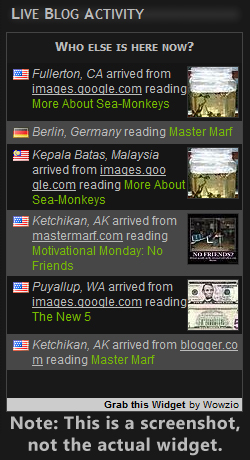 I've did away with the poll widget in the sidebar to make room for the new "Live Blog Activity" widget by Wowzio. I may do polls again later, we'll see. The polls were not as active as I would have hoped, so it was time for something new.
Here's the results from the poll before I removed it. "More posts about...": Me (the author) 2, Ketchikan Alaska 1, Random crap 3, and Other blogs 3. I I'll keep it in mind that random crap and other blogs ranked the highest. I was actually a little surprised that Ketchikan, Alaska didn't get more votes.
Anyway, back to the new widget. I think it's pretty nifty. Whenever a page on the blog loads, it gets the user's location and source. It then sends that information to every open instance of the widget on the blog. So any new entries in the widget you see appear are live. It obtains your location based on your IP address. Javascript is required to see the widget, but most everything requires javascript these days anyway. I hope there's enough activity on the blog to make the widget worth it. I'll just have to wait and see.
How did I find this widget? I was checking out some of the links in a recent Blogger Buster article about tutorials and sites for Blogger users. A few of the other links in the article were interesting as well.
It's going to be interesting to watch the widget. Sure, I use Google Analytics to track my traffic. I could already see locations and such of my visitors. But there's just something special about seeing the live hits. Oddly enough, among my most popular articles is More About Sea-Monkeys. If the screenshot I took of the widget is any indication, you'll be able to see the live data to back up that claim. Another popular one is Lots of Google Images.
Please, leave feedback about the widget in the comments if you wish.
Thursday, August 28, 2008
«First AdSense Payment»
 Yesterday I officially I received my first payment from the Google AdSense ads. I was paid $119.71 USD. You don't get paid until your balance is over $100. Once you pass $100, you'll get paid at the end of the next month. It sure took me long enough to get there, but I've noticed an increase in the last few months, so it shouldn't take as long the next time around.
So now that the blog is paying for itself, I went ahead and bought ad-free hosting from GoDaddy.com. I was waiting for that payment before I spent any more money on the blog. I wasn't all that pleased how long it took to login and use the in-browser interface with the hosting to upload files. So, remembering a recent Hive Five post on Lifehacker about FTP clients, I looked at what ranked the highest there and downloaded FileZilla. I like it.
Since I don't have that annoying GoDaddy banner ad (from the free ad-supported hosting) at the top of the Blog Supplement pages, I removed the old ones that were on the googlepages domain. Please update your bookmarks accordingly.
I know there have been a lot of posts lately talking about the updates here. I've been doing a lot behind the scenes, and it's just what's on my mind currently.
Tuesday, August 26, 2008
«Blog Supplements Moved Over»
I've got the blog supplements over at their new location. For those of you who didn't read it before or forgot, what I call my "blog supplements" are just the other links in the sidebar, under navigation (the games and such). However, I have not removed the old ones yet. Feel free to update any bookmarks you may have so they reflect the domain change.
For now you'll see the GoDaddy ads at the top of those pages. I haven't updated the hosting yet, so I'm still on the free ad-supported hosting. Also for the time being, the pages do not validate as valid XHTML strict due to the ad code that's tacked on to the end.
I might just end up going with the paid GoDaddy hosting. I already have it set up, after all. Yes, I've read their customer support isn't the best of the industry, but as my dad pointed out, I can probably figure out anything I need to do on my own anyway.
If there are any of you that have been with me from the beginning, way back when my only website was Realm of Marf, I thank you for keeping up with all the domain address changes I've gone through: RealmOfMarf.googlepages.com, mastermarf.googlepages.com, mastermarf.blogspot.com... It shouldn't change much from here on out. For once I own my own domain, and I plan to keep it that way. Unlike all the others, mastermarf.com is mine alone. The only thing that could change now is if I decide to reorganize my subdomains.


 Some Rights Reserved